Frigate, Fricam, and the story in between
I've been running Frigate as my NVR for a long time. Open source, great Home Assistant integration, local object detection, recordings stay on my own hardware. But every time I wanted to check a camera I had to either sit down at a desktop or pull up the web UI on my phone. Not exactly the "glance whenever I want" experience I was after.
There are alternatives out there. But when I looked, the vast majority turned out to be just WebView wrappers around Frigate's own web interface. Effectively the same as opening a browser tab; no native notifications, no widgets, no Apple Watch. At some point I decided to build it myself, and that became Fricam.
What is Frigate?
Frigate is an open-source NVR that runs on your own server. The key difference: camera footage never leaves the machine Frigate is running on. With Google Nest or Ring, your video goes to the manufacturer's cloud, AI detection happens there, and you're paying them in both money and data.
With Frigate, AI detection (via Coral TPU or a local GPU) runs on your own hardware. Events like "person at the door" or "car in the driveway" are detected without anything leaving your network. Pair it with Home Assistant and you can build automations like "turn off the lights when there's no motion" or "send an alert when the doorbell rings."
Using Frigate does require some technical knowledge: running Docker, finding your camera's RTSP stream URL, writing a config file. That shapes the user base into a pretty specific profile: people who want control over their own infrastructure, care about privacy, and are into home automation.
Why I built the app
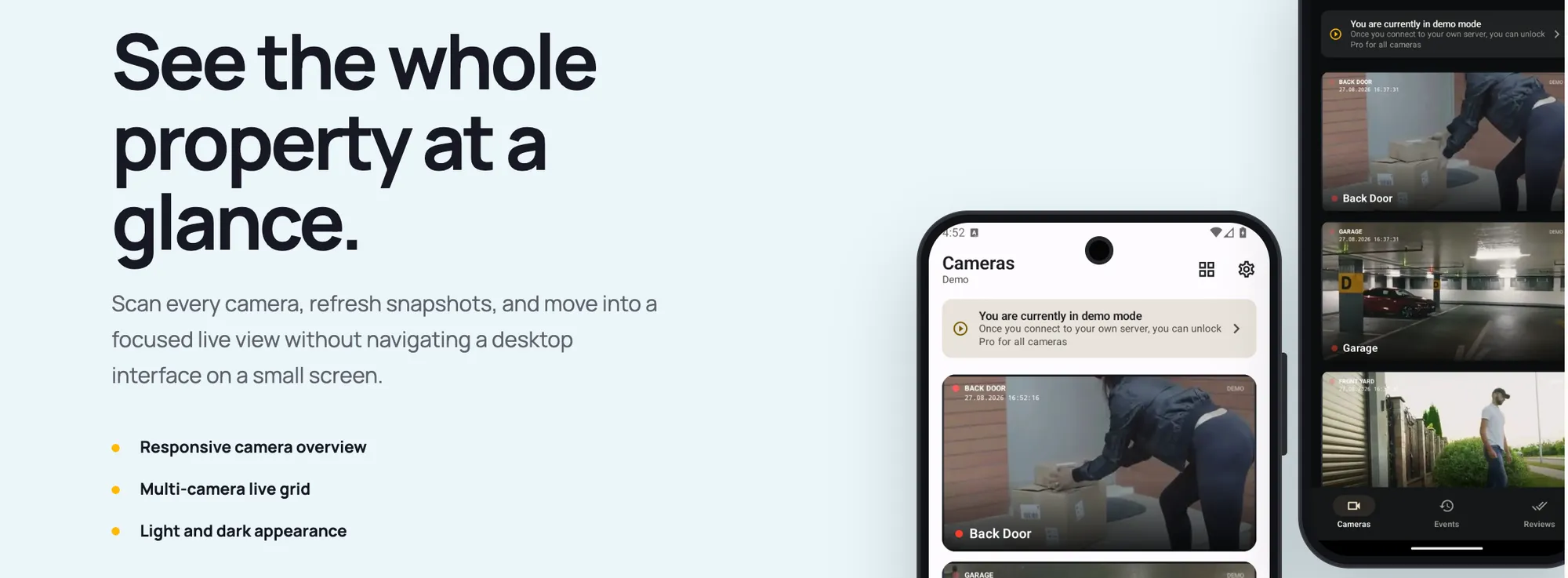
Frigate's web interface is fine, but it's not optimized for mobile. It works on a phone, but it doesn't feel native.
When I looked at existing apps, most of them were just wrapping the Frigate web UI in a WebView. Nothing fundamentally different happening underneath. What I wanted was native notifications, a camera widget, Apple Watch support, and all of it talking directly to Frigate's API.
I built it for my own use for a few months, then figured other people with the same setup would want it too, so I put it in the stores.
How it works technically
Fricam consumes Frigate's HTTP API and go2rtc. Frigate uses go2rtc internally to serve media, so WebRTC and RTSP streams come through go2rtc. Fricam expects stream names to follow a specific convention: cam-name_sub, cam-name_detect, and so on. Once you've set up your camera names and stream types, the app decides which stream to use and when, automatically.
You need go2rtc's ports 8554 (RTSP) and 1984 (HTTP/WebRTC) reachable. On a local network that just works. Accessing it remotely is a bit more involved, and I'll get to that below.
Notifications run through Fricam's own infrastructure, Home Assistant is not required. Enable notifications on your Frigate server and detection events show up in Fricam immediately. No duplicate alerts for the same event; follow-ups update the existing notification rather than stacking. With biometric lock enabled, the snapshot stays hidden until you open the app and unlock it.
How the development went
I didn't build iOS and Android at the same time. Android shipped first. A while later I finished iOS, and iPad and Apple Watch came along with it.
The trickiest part of iOS was App Review. Since Frigate runs on your own infrastructure, the reviewer has no access to a real Frigate server. Demo mode solved this: there's a mock server running inside the app, but the app doesn't "know" it's in demo mode; the real client code runs against it. The reviewer can try every feature. Pro is also unlocked in demo mode.
The Apple Watch app turned out more interesting than I expected. Having the camera list on your wrist, glancing at a feed just by raising your arm; when I tested it for the first time the "this actually works" feeling was real.
The Pro plan also includes Home Assistant integration on both Android and iOS. You can place controls for lights, locks, doors, and other HA entities directly on any camera view.
Fricam Edge: remote access and the privacy question
This section is longer because the decisions here are as much about principle as they are about engineering.
Frigate runs on your local network. The standard options for remote access are: set up a VPN, configure a reverse proxy, or open ports. Each has a complexity cost. A VPN is the most secure option but not easy to set up for everyone. Opening ports creates security exposure.
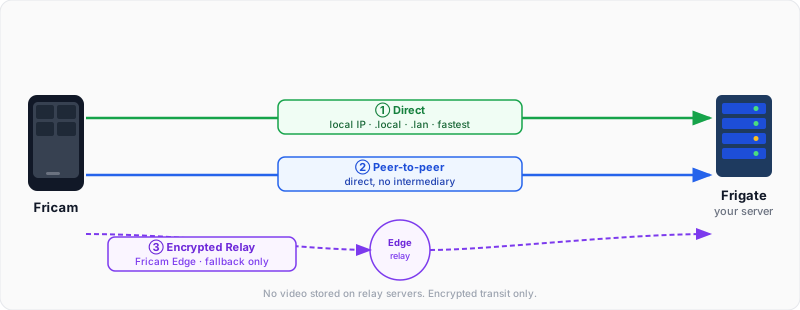
Fricam Edge approaches this differently: managed relay infrastructure. The connection logic works like this:
The app first tries a direct connection (local IP or .local/.lan hostname). If that fails, it tries peer-to-peer. If that also fails, an encrypted relay kicks in.
Even when the relay is active, your video data doesn't sit on my servers in plaintext. The relay works like an encrypted tunnel; nothing is recorded, nothing is stored. The plan includes 10 GB of encrypted relay data per month. How far that goes depends on your camera quality and how often the relay is actually needed, but it covers typical use cases comfortably.
You don't need Edge to use Fricam. Buy Pro and handle remote access yourself with a VPN or whatever network setup you prefer. Edge is optional and a separate subscription.
Pricing
Two products.
Fricam Pro is a one-time purchase. The app is free to download and you can try everything in demo mode. Unlocking Pro enables notifications, multi-camera grid view, and Home Assistant integration. Pay once, use it for as long as you want. On iOS, it supports Family Sharing.
Fricam Edge is a separate, optional subscription. Monthly or yearly options, with a trial period. Pro users get a discounted rate.
Where things stand, what's next
Android and iOS are live in the stores. iPad has a full large-screen layout, and the Apple Watch app runs standalone.
Next up: Wear OS, Android TV, and Apple TV. The TV app is a particularly interesting use case: camera feeds on your living room screen without any additional setup. Wear OS fills the same quick-glance role as Apple Watch for Android users. These are planned but not shipped yet.
This started as a side project and still is. Not something that came out of a full-time company; I build it, feedback comes in, I fix things, I add new stuff. The Frigate community has been the best source of input throughout.
If you're running Frigate and want a better mobile experience, give it a try. Demo mode shows you everything without needing a real server.
Download on the App Store - iPhone, iPad and Apple Watch
Get it on Google Play - Android
Fricam is an unofficial, independent client for Frigate NVR. Not affiliated with or endorsed by the Frigate NVR project.
Member discussion